
How to See if Someone Deleted Messages on WhatsApp
When people often use the WhatsApp system in their daily life, they will face some situations in which the “messages have been deleted.” The deleted messages could be accidental or intentional. Sometimes, it can make people curious or worried about missing important information. This article will introduce the restrictions of WhatsApp and demonstrate how to view deleted messages through tools like GBWhatsApp, in order to assist users in making better use of it.
WhatsApp’s Delete Feature
WhatsApp allows users to delete messages from both individual and group chats. There are two main options: Delete for Everyone and Delete for Me.
- Delete for Everyone removes the message from both the sender’s and the recipient’s chat.
- Delete for Me only removes the message from the sender’s side.
When a message is deleted for everyone, the chat usually shows a notification like “This message was deleted.” However, WhatsApp does not reveal the content of the deleted message.
How to Know If A Message Was Deleted
The following approach determines whether a message has been deleted in WhatsApp.
- The chat window displayed the message “This message has been deleted”.
- The messages that were originally indicated as sent or read suddenly disappeared.
- The message status in the group chat is abnormal, but you haven’t received the specific content.
These signs indicate the sender deleted the message, but the content itself remains inaccessible on the official app.
Limitations of WhatsApp in Viewing Deleted Messages
There is no facility to see any deleted messages in WhatsApp directly. Once a message is deleted for everyone, the content is permanently removed from the chat. This is done to maintain the privacy of users who intentionally delete messages.
Some indirect ways, like notification history or backup restores, may sometimes reveal deleted messages, but these methods are inconsistent and can be unreliable.
GBWhatsApp View Deleted Messages Feature
Compared with WhatsApp, GBWhatsApp provides additional features, including viewing deleted messages.
- Deleted messages remain visible in the chat history.
- Users can see text, images, videos, and voice messages that were deleted.
- No extra apps are needed; this feature works directly within GBWhatsApp.
With GBWhatsApp, it’s easy to avoid missing important information, which is especially useful for work chats and group conversations.
How to View Deleted Messages in GBWhatsApp
GBWhatsApp allows users to see messages even after the sender deletes them. Setting this up is quick and can be done directly from the app:
Step 1: Open GB WhatsApp and select any chat.
Step 2: Tap the menu icon (three dots) at the top corner of the screen.
Step 3: Choose GB Settings from the list.
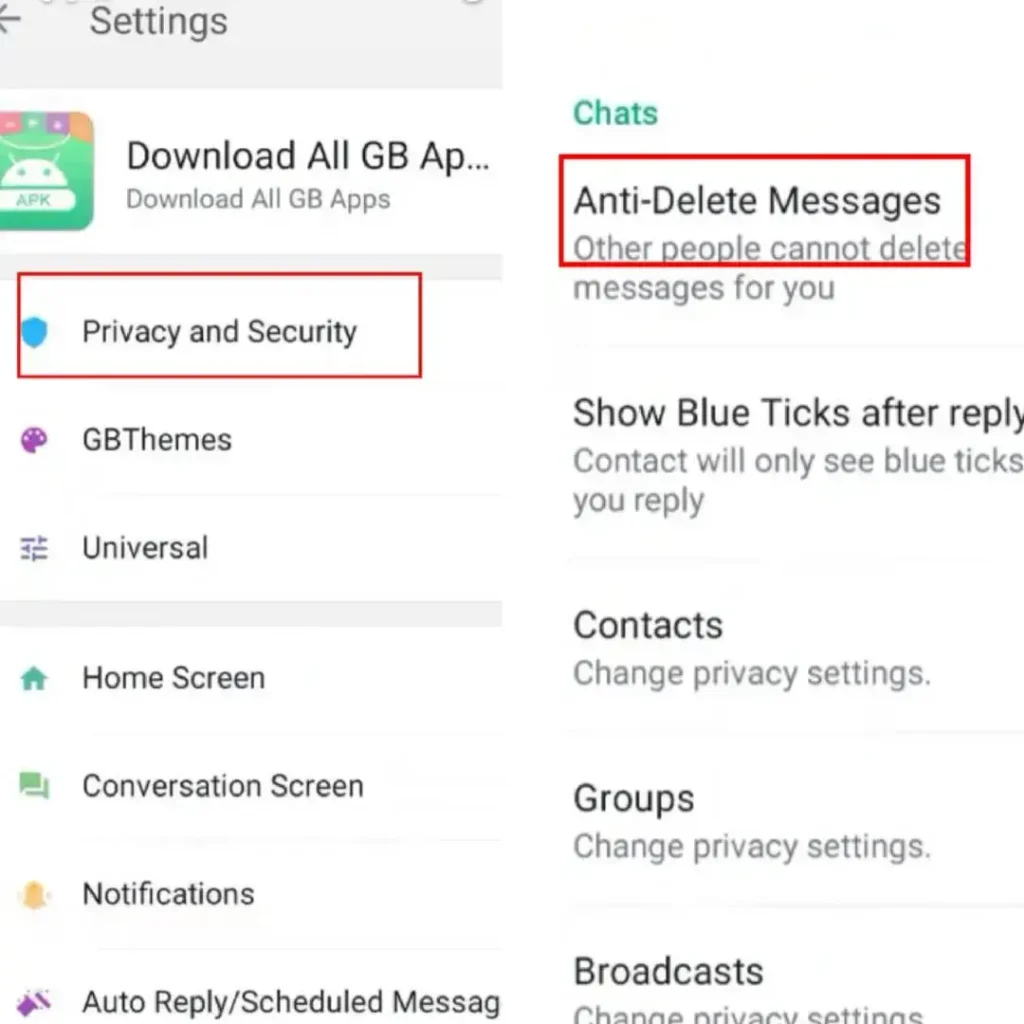
Step 4: Scroll to Privacy Options within the settings menu.
Step 5: Look for the “Anti-Delete Messages” option
Step 6: Switch the toggle to turn it on.
Step 7: Close and reopen the app to ensure the feature starts working.
After activation, any deleted messages will still be retained in your chat history. This way, you won’t miss any information.
Risks and Precautions with GBWhatsApp
GBWhatsApp is not an official app, and it is not available on Google Play. Users must download it from third-party sources, which introduces potential risks:
- Malware or privacy breaches from unofficial downloads.
- Potential account suspension by WhatsApp for using modified versions.
- Limited official support and updates.
Users should only download GBWhatsApp from reliable sources to reduce risks. They should also carefully set the application permissions and regularly back up chat records.
Conclusion
In WhatsApp, there is a common function whereby you can erase messages that you sent. But it may cause users to miss important information. With GBWhatsApp, you can view the messages that others have deleted, thereby enhancing your ability to grasp information. It should be noted that GBWhatsApp is a third-party application. When using it, one should pay attention to account security and strike a balance between practicality and risks.